
Grocery Lists
Shared, always‑in‑sync shopping lists you can reach from anywhere.
Grocery lists in Yuki are quick to build and easy to share. Add items with quantities, tick them off as you shop, and keep everyone on the same list.
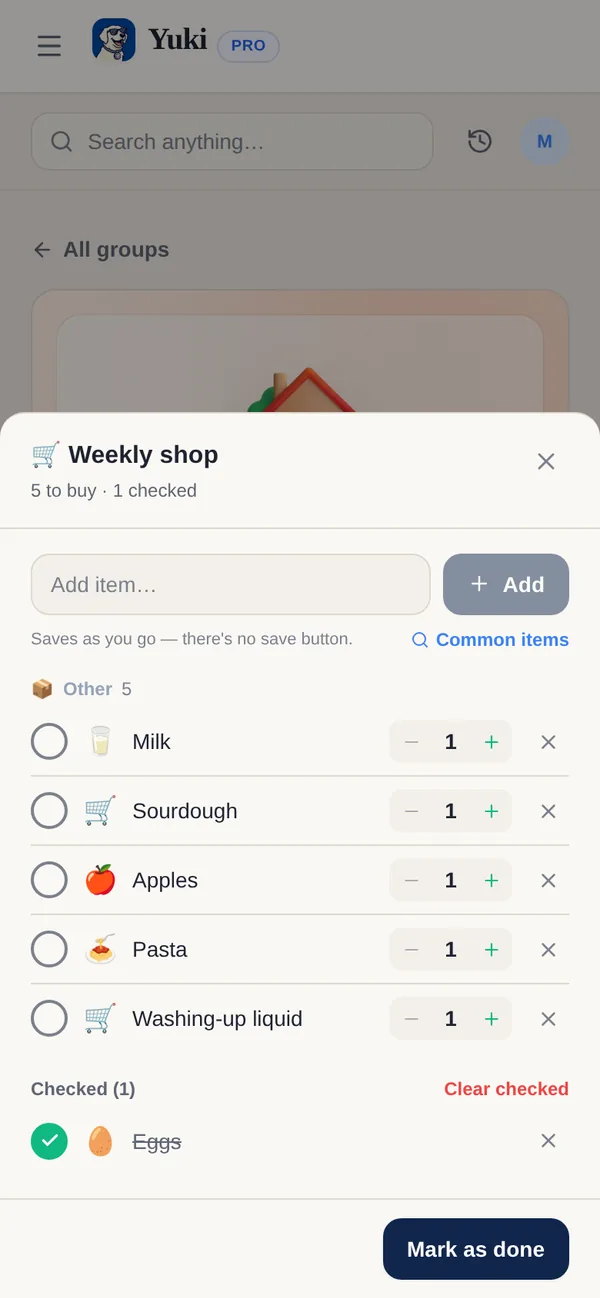
Create and manage a list
- 1Tap + (New on the web) and choose Groceries and Recipes — or open a group’s Groceries tab.
- 2Add items, or pick from Common items, and set quantities with − and +.
- 3Tick items off as you shop; the list saves as you go and stays in sync for everyone.
- 4Clear checked items, or tap Mark list as done (Mark as done on a group list) when the shop is finished.
Start with a recipe
Choose From a recipe when creating a list (on the web it opens New list from a recipe). Find a dish, adjust servings and review the ingredients before adding what you need. Pantry staples and optional ingredients can be left out. See Recipes & groceries.
With Pro or an active Pro trial, turn a recipe into a multi-step cooking timer. Open the recipe’s method and choose Play with a timer · Pro, then review durations before starting. The timer is private to you; it does not complete the grocery list or order anything.
Find your lists anywhere
Every list that still has something to buy shows on Home under Unfinished grocery lists — personal and group lists together. A list planned for a day also shows on that day in Calendar.
Share with a group
Make a list in a group, like your household, and everyone in it can add items and tick things off together — whoever is shopping sees the whole list live. See Groups.